
The AI accounting almost nobody does — Dollar does it for you.几乎没人做的那本 AI 账,叨乐替你记着。
Most people never know what their AI agents actually cost. Dollar keeps a quiet, honest, local tally — clearly estimated from your own logs and pricing settings, and never pretending to be your bank statement.大多数人从不知道自己的 AI 助手到底花了多少钱。叨乐安静地记着一本诚实的本地账——基于你自己的日志和价格设置明确估算,从不假装自己是你的银行账单。
Local estimates, not a bill · Windows-only · Local-first本地估算,不是账单 · 仅限 Windows · 本地优先

Honest local estimates — never dressed up as a bill.诚实的本地估算——绝不打扮成账单。
Dollar reads what's available on your machine and prices it with your own settings. Some sources report more granular usage than others, so every figure is an estimate — clearly marked, kept in its own column, and never presented as an official bill.叨乐读取你电脑上可获得的信息,并用你自己的设置来计价。不同来源的用量记录粗细不同,因此每个数字都是估算——清晰标注、单列呈现,绝不当作官方账单。
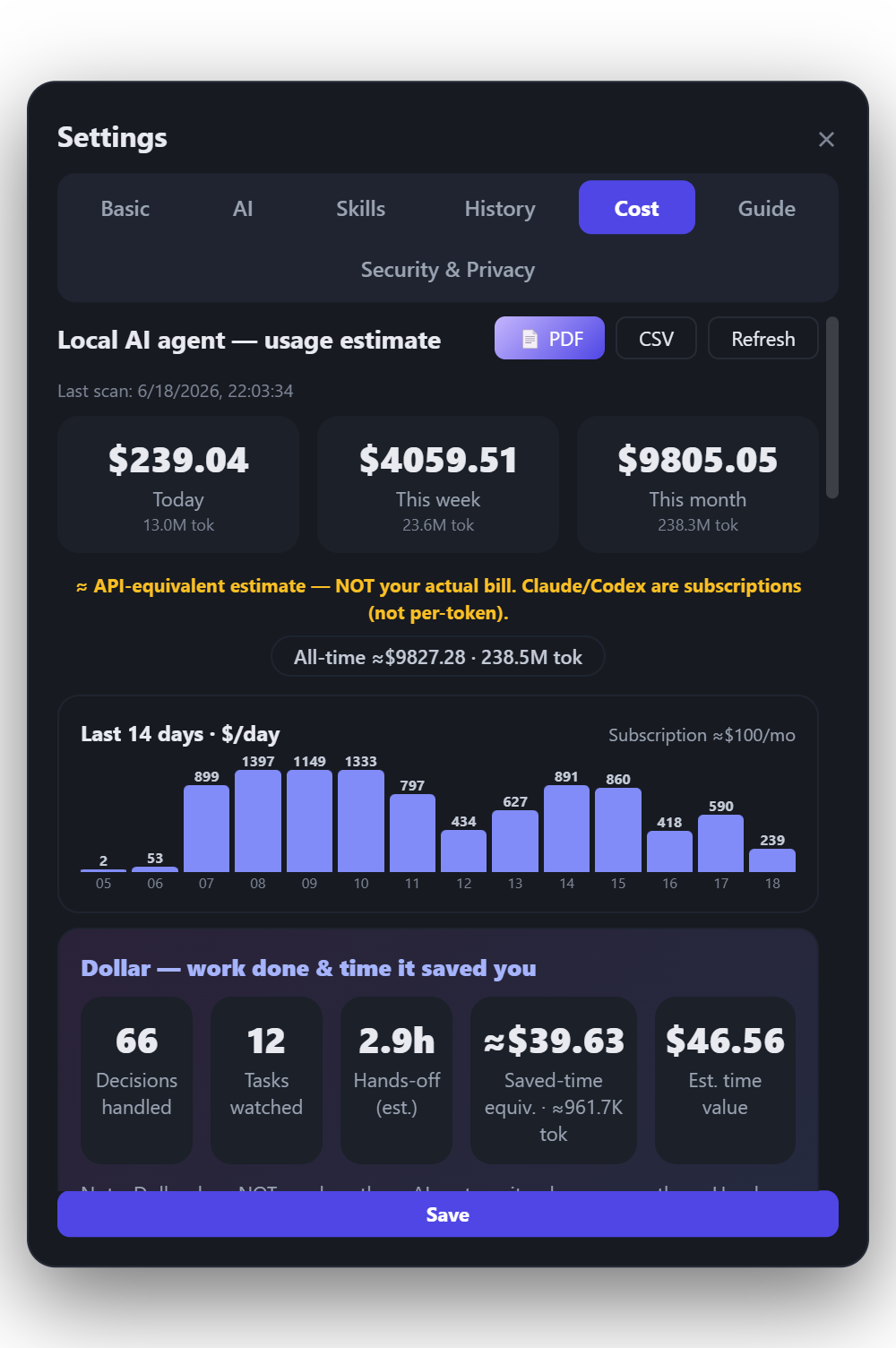
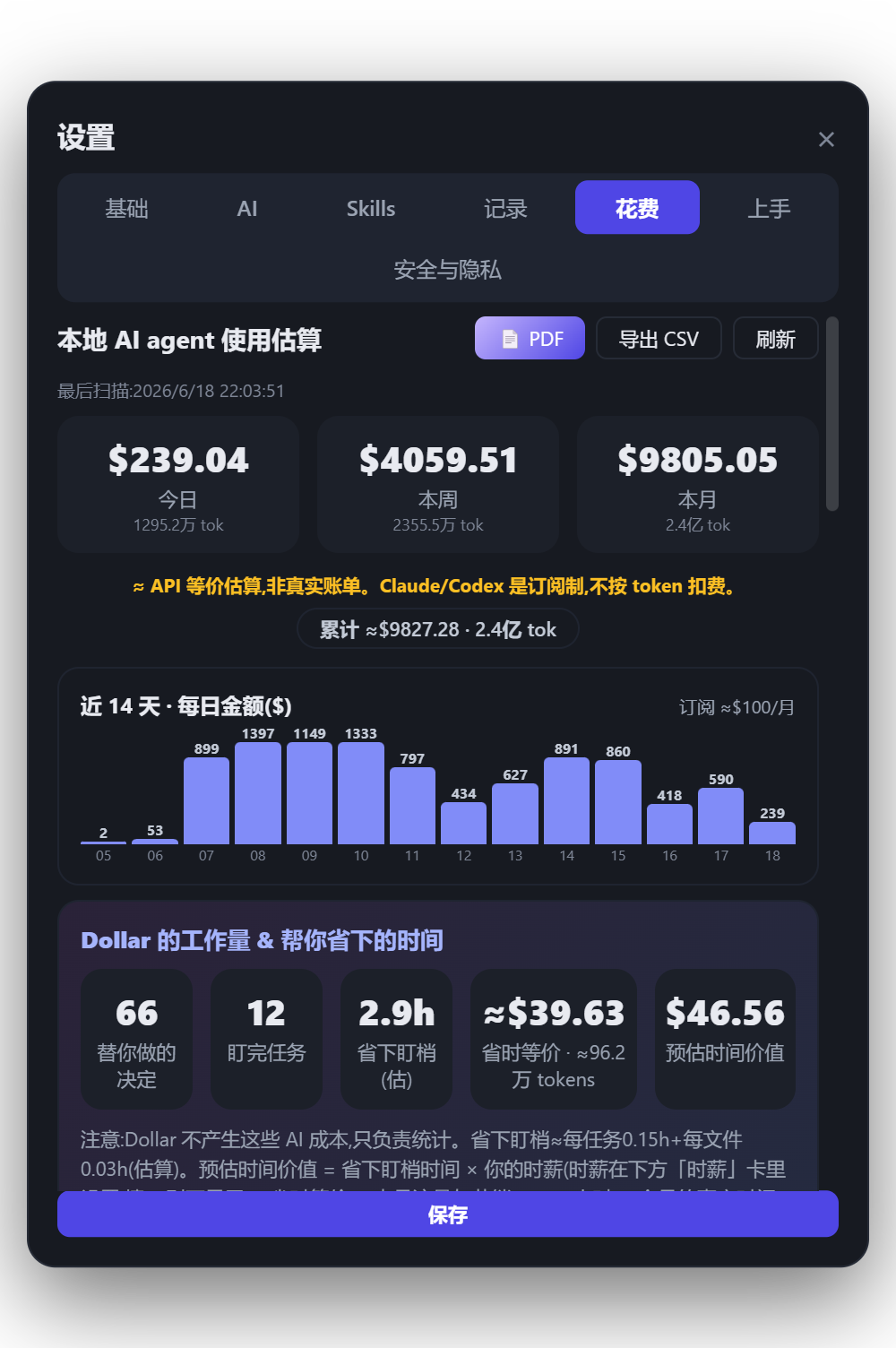
A real capture. Today / this week / this month, a 14-day chart, and ROI — every figure marked ≈ and priced at your own editable rates.真实截图。今日 / 本周 / 本月、14 天柱状图与 ROI——每个数字都标 ≈,按你自己可编辑的费率计价。
The ≈ stays on every estimated figure, everywhere it appears. You won't ever see an estimate dressed up as an exact number.≈ 会留在每一个估算数字上,出现在哪里都带着它。你绝不会看到一个估算被打扮成精确数字。
Plan-fit, lighter-model tips, and an honest read on your spend.套餐适配、更轻模型建议,把花费看明白。
Beyond a running total, Dollar helps you read the shape of your spend — which plan actually fits, and where a lighter model would do.除了一个跑动的总数,叨乐还帮你读懂花费的形状——哪种套餐真的合适、哪里换个更轻的模型就够了。
Plan-fit guidance套餐适配建议
Tracks Claude's 5-hour and Codex's usage windows, then suggests whether Pro, Max 5×, or Max 20× actually fits how you work.跟踪 Claude 的 5 小时与 Codex 的用量窗口,再告诉你 Pro、Max 5×,还是 Max 20× 才真正贴合你的用法。
Lighter-model tips更轻的模型提示
When a lighter model could likely handle the work, Dollar mentions it — gently, and only as a suggestion.当一个更轻量的模型大概也能搞定时,叨乐会温和地提一句——只是建议,不替你做主。
Manual subscriptions手动订阅记账
Add the flat monthly plans you pay for by hand, so the full picture of your AI spend lives in one place.把你手动支付的固定月费套餐加进来,让 AI 花费的全貌都在一个地方。
Runs where you work就在你工作的地方
A local Windows app — the tally lives on your machine, running a local-only service, with nothing shipped to a server.一个本地 Windows 应用——账本就在你电脑上,运行本地服务,不向任何服务器上传。
Two honest ways to see what your AI is worth.两种诚实的方式,看清你的 AI 值多少。
Spending is only half the story. Dollar puts your costs next to the time and money your AI helps you save — so you can judge the trade for yourself.花钱只是故事的一半。叨乐把你的成本,摆在 AI 帮你省下的时间与金钱旁边——让你自己判断这笔买卖划不划算。
What your spend buys back in time这笔花费买回了多少时间
Dollar estimates the time and money your AI workflow is worth — comparing your costs against the hours and decisions your agent saved, shown in both tokens and dollars.叨乐估算你的 AI 工作流价值——拿成本和你的助手节省的时间和决策做对比,以 token 与美元两种形式呈现。
What hands-off hours are worth那些放手的时间值多少
Tell Dollar your hourly wage, and he values the hands-off hours — the time your agent worked while you didn't — as salary saved. A simple, human way to frame the gain.告诉叨乐你的时薪,他会把那些「放手的小时」——助手在干、而你没在干的时间——折算成省下的工资。一种简单、贴近人的衡量方式。
Dollar measures these costs — he doesn't create them. The spend is your AI tools'; he just keeps the math honest.这些成本是叨乐在衡量——而不是他制造的。花费来自你的 AI 工具,他只是把这笔账算得诚实。
What one busy afternoon can look like.一个忙碌的下午,大概长这样。
An illustrative session — not real data — to show how the numbers add up. Every figure is an estimate (≈) at example rates; set your own in the app.一个示例会话——不是真实数据——只为让你看清这笔账怎么算。每个数字都是估算(≈),按示例费率;实际费率你在 app 里自己设。
A 2-hour refactor with Claude Code用 Claude Code 重构 2 小时
A quiet local tally — built from your own logs as you work.一本安静的本地账——边工作边按你自己的日志记下。
Spend vs. what you got back花费 vs. 换回了什么
≈ $3.10 spent · ≈ $40 of time back — you decide if that trades well.≈ $3.10 花费 · ≈ $40 时间换回——划不划算,你来定。
Illustrative example with example rates — not a real bill and not a typical-result claim. Your figures depend on your own usage, models, and pricing settings, and every number stays marked ≈.示例数据、示例费率——不是真实账单,也不代表"典型结果"。你的数字取决于你自己的用量、模型与价格设置,且每个数字都始终标 ≈。
Take the numbers with you — and keep your context fresh.把数字带走——也让你的上下文保持清爽。
When you need to share or file the spend, Dollar exports it cleanly. And when a session gets long, he helps you hand off and start fresh without losing the thread.当你需要分享或归档花费时,叨乐会干净地导出。而当一段会话变长,他会帮你交接、重新开始,又不丢失线索。
Your numbers, ready to share — with the private bits left out.你的数字,随时可分享——私密的部分已被移除。
Context window: getting long
Usage window: 4h 12m of 5h used上下文窗口:正在变长
用量窗口:5 小时已用 4 小时 12 分
"Things are getting long. Want me to copy a handoff so you can start fresh?"「对话有点长了。要我复制一份交接,让你重新开始吗?」
A usage-window and context monitor. When context gets long, one click copies a handoff so you can start a fresh session without losing where you were.一个用量窗口与上下文监测器。当上下文变长时,一键复制交接,让你开启新会话又不丢失进度。
Honest numbers, kept on your machine.诚实的数字,留在你的电脑里。
Local estimates from your own logs and pricing settings, exports auto-redacted, the whole tally on your machine. Dollar's Cost & Value Meter is part of 1.0 — a careful guide to your AI spend, never a substitute for your provider's own statement.基于你自己的日志和价格设置做本地估算,导出自动脱敏,整本账都在你电脑上。叨乐的成本与价值仪表属于 1.0——它是你 AI 花费的细致向导,绝非你服务商账单的替代。
One-time purchase — current price on the Steam page.一次买断——价格以 Steam 页面为准。
Cost figures are local estimates based on available logs and pricing settings. They are not official billing records. Dollar measures spend, it doesn't create it — a guide, not a replacement for your provider's official billing.费用数据基于本地日志和价格设置估算,不代表官方账单。叨乐衡量花费,而非制造花费——它是参考,而非你服务商正式账单的替代。